
AI Game Makers for Building Interactive Game Environments
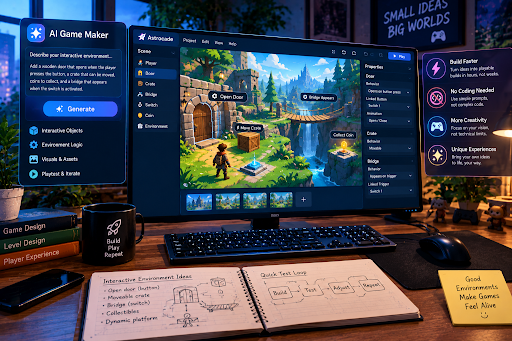
An interactive environment is often what separates a game that feels alive from one that feels like a static backdrop players happen to walk through. Doors that open, objects that react, terrain that changes based on what a player does, these details add up to a world that feels responsive rather than decorative. Building environments like this used to require a meaningful amount of technical work, enough that many small teams and solo creators simply left interactivity out and focused on core mechanics instead. AI game makers are starting to close that gap, making responsive, interactive environments realistic even for creators without a large technical team behind them.
Why Interactive Environments Matter So Much
Static Worlds Feel Like Backdrops, Not Places
A level that never changes regardless of what a player does tends to feel more like scenery than a real place. Even small interactive touches, a crate that can be moved, a switch that opens a path, a surface that reacts differently depending on player action, give a space a sense of presence that static environments can’t match.
Interactivity Signals Depth Even in Simple Games
Players often use environmental interactivity as a shorthand for how much thought went into a game overall. A world with even a few responsive elements feels more considered than one where everything is fixed in place, even if the core mechanics are otherwise similar in complexity.
Why Interactive Environments Were Historically Hard to Build
Every Interaction Used to Require Custom Logic
Traditionally, each interactive element in an environment needed its own logic written and tested individually. A door that opens when a switch is triggered, an object that reacts to being pushed, a wall that crumbles under certain conditions, each of these required a developer to manually define the behavior, test it, and make sure it didn’t conflict with other systems in the game.
Small Teams Often Cut Interactivity First
Because building interactive elements took real development time, smaller teams and solo creators frequently treated it as a lower priority compared to core mechanics or content volume. This meant a lot of otherwise solid games ended up with environments that felt flatter than they could have, simply because interactivity was one of the first things cut under time pressure.
How AI Is Making Interactive Environments More Accessible
Describing Behavior Instead of Coding It
AI game makers let creators describe how an object or environment element should behave in plain language, rather than manually writing and debugging the logic themselves. A creator can specify that an object should react when touched, or that a section of the environment should change after a certain event, and the underlying implementation gets handled without requiring deep technical knowledge.
Faster Testing of How Elements Feel Together
Interactive environments often need adjustment once multiple elements are combined, since something that works well in isolation can feel cluttered or confusing alongside other interactive pieces. AI-assisted tools speed up the process of testing these combinations, letting creators quickly see how different interactive elements feel together rather than testing each one separately over a long development cycle.
Generating Variations Without Starting From Scratch
Once one interactive behavior is established, AI can help generate variations of it quickly, such as adjusting how an object reacts under different conditions. This lets creators explore a range of interactive possibilities within an environment without manually rebuilding similar logic each time.
Building Environments With a No-Code AI Platform
Having the ability to describe environmental behavior in plain language is only useful if there’s a platform that can actually turn that description into something playable quickly.
A Platform Designed for This Kind of Creation
Astrocade is an example of an AI game maker built around letting creators bring interactive ideas to life without needing to write code themselves. Instead of manually scripting each interactive element, creators can describe what they want an environment to do and see it working in a playable build relatively quickly.
Seeing Interactive Design in a Real Game
Steal a Chicken is a good example of a game built around a playful, interactive premise rather than a static setup. Games like this rely on the environment itself feeling reactive and a little unpredictable, which is exactly the kind of interactivity that used to require much more manual development effort to pull off.
What Still Requires Human Design Judgment
Deciding Which Interactions Actually Matter
AI can help implement interactive behavior quickly, but it can’t decide which interactions are worth including in the first place. Filling an environment with interactive elements for their own sake often creates clutter rather than depth, and a designer still needs to choose which interactions actually serve the experience.
Making Sure Interactions Feel Consistent
Players build expectations quickly based on how a few objects behave, and inconsistency between similar-looking elements can break immersion. Ensuring that interactive elements feel coherent across an environment is still a design judgment call that AI-assisted tools support but don’t make on their own.
Balancing Interactivity Against Clarity
An environment can become confusing if too many things react in too many different ways at once. Deciding how much interactivity is appropriate for a given space, and making sure players can still read what matters, remains a human design decision.
Common Mistakes When Adding Interactivity
Adding Interactive Elements With No Purpose
Not every object needs to react to the player. Interactive elements work best when they serve a clear function, whether that’s a puzzle, a shortcut, or a moment of surprise, rather than existing just because they were easy to add.
Neglecting Feedback When Something Reacts
An interactive element that changes without any clear visual or audio feedback can confuse players rather than delight them. Even simple interactions benefit from a clear signal that something happened as a result of the player’s action.
Overloading Early Areas With Complexity
Introducing too many interactive systems at once, especially early in a game, can overwhelm players before they’ve built a mental model of how the world works. Interactivity tends to land better when it’s introduced gradually.
A Practical Approach to Building Interactive Environments
A reasonable starting process looks like this. Identify a small number of interactive elements that genuinely support the core gameplay loop, rather than trying to make everything reactive at once. Use an AI-assisted platform to describe and test those behaviors quickly, checking how they feel individually before combining them in the same space. Pay close attention to feedback, making sure players can clearly tell when their actions changed something, and introduce more complex interactions gradually as players get comfortable with the basics.
Final Thoughts
Interactive environments used to be a luxury that many smaller creators simply couldn’t afford the development time for. AI game makers are changing that by handling much of the technical implementation, which frees creators to focus on deciding which interactions actually make a world feel alive. The technology speeds up the building, but the judgment about what makes an environment worth exploring still comes down to the person designing it.

Abhishek Sharma is a technology enthusiast and experienced content writer with a strong interest in mobile apps, games, software, and the latest developments in the digital world. He enjoys exploring new applications and gaming platforms, testing their features, and sharing useful information in a simple and easy-to-understand way.